Make it in Korva
Flyer Sizes: Standard Dimensions for Print and Digital

Quick answer
The standard flyer size is 8.5 × 11 in (US Letter) or A4 (210 × 297 mm). Half-page is 5.5 × 8.5 in, quarter-page 4.25 × 5.5 in, and A5 is 148 × 210 mm.
The standard flyer size is US Letter, 8.5 × 11 in, in the United States and Canada, and A4, 210 × 297 mm, almost everywhere else. The next most common are the half-page flyer (5.5 × 8.5 in, or A5 at 148 × 210 mm) and the quarter-page flyer (4.25 × 5.5 in, or A6 at 105 × 148 mm), which print two and four to a sheet. Below is every common flyer size in inches, millimeters and pixels, how many fit on a sheet, the sizes that work on social media, and how to choose between them.
“Flyer” is not a paper size. It is a job: a single sheet that tells people about one thing. Any size can do that job. The sizes that count as standard are the ones cut cleanly from paper that every printer and print shop already stocks, which is why they are cheap to produce and easy to reorder.
So the useful question is never “what size is a flyer?” but “what size is this flyer?” That depends on where it will be seen, how it gets there, and how it will be printed. This page gives you the numbers first, then the decision.
Flyer size chart
Every common flyer size in one table. Dimensions are the finished, trimmed size, portrait orientation.
| Size | Inches | Millimeters | Pixels at 300 DPI | Best for |
|---|---|---|---|---|
| US Letter (full page) | 8.5 × 11 | 215.9 × 279.4 | 2550 × 3300 | The default US flyer: noticeboards, shop windows |
| Half Letter (half page) | 5.5 × 8.5 | 139.7 × 215.9 | 1650 × 2550 | Handouts, event tables, counter stacks |
| Quarter Letter (quarter page) | 4.25 × 5.5 | 108 × 139.7 | 1275 × 1650 | Door-to-door drops, bag stuffers |
| Postcard | 4 × 6 | 101.6 × 152.4 | 1200 × 1800 | Mailers, promo cards, loyalty offers |
| Invitation | 5 × 7 | 127 × 177.8 | 1500 × 2100 | Invitations, premium handouts |
| Rack card | 4 × 9 | 101.6 × 228.6 | 1200 × 2700 | Brochure racks, envelope inserts |
| US Legal | 8.5 × 14 | 215.9 × 355.6 | 2550 × 4200 | Menus, price lists, schedules |
| Tabloid (Ledger) | 11 × 17 | 279.4 × 431.8 | 3300 × 5100 | Posters, windows, the headline spot on a board |
| A3 | 11.69 × 16.54 | 297 × 420 | 3508 × 4961 | Posters outside North America |
| A4 | 8.27 × 11.69 | 210 × 297 | 2480 × 3508 | The default flyer outside North America |
| A5 | 5.83 × 8.27 | 148 × 210 | 1748 × 2480 | Handouts and leaflets |
| A6 | 4.13 × 5.83 | 105 × 148 | 1240 × 1748 | Small flyers, leaflet drops, postcards |
| DL | 3.9 × 8.27 | 99 × 210 | 1169 × 2480 | Rack flyers, DL envelope inserts |
How the numbers are derived: an inch is exactly 25.4 mm, so the millimeter figures for US sizes are exact (quarter Letter’s 107.95 mm is rounded to 108). The ISO sizes are defined in millimeters, so their inch figures are rounded to two decimals. Pixels are inches × 300, rounded to the nearest whole pixel. If you also need the envelope, B-series and larger poster sizes, our paper sizes chart has the full US and ISO families in one place.
What is the standard flyer size?
In the US and Canada, 8.5 × 11 in. Everywhere else, A4 (210 × 297 mm, or 8.27 × 11.69 in). Both are simply the office paper of their region: the sheet already in every printer tray, the cheapest to buy, and the size noticeboards, clipboards and plastic sleeves are built around.
That makes full-page the standard, but not always the most common. For flyers that get handed out rather than pinned up, the half-page flyer is at least as common, for reasons of cost. Printing is priced per sheet, so a design that fits two to a sheet costs half as much to produce. Our guide to making a flyer covers that economics in more detail, along with the hierarchy and wording that make any size work.
If you are asking about the flyer size in inches specifically: 8.5 × 11 in for Letter, 5.5 × 8.5 in for half-page, 4.25 × 5.5 in for quarter-page. A4 is 8.27 × 11.69 in, a quarter-inch narrower and about two-thirds of an inch taller than Letter.
US vs international flyer sizes
North America uses inch-based sizes derived from the Letter sheet. Nearly everyone else uses the ISO 216 A series. Every US size has a close ISO cousin, and none of them is the same.
| US size | Closest ISO size | How they differ |
|---|---|---|
| Letter, 8.5 × 11 in (215.9 × 279.4 mm) | A4, 210 × 297 mm | Letter is 5.9 mm wider; A4 is 17.6 mm taller |
| Half Letter, 5.5 × 8.5 in (139.7 × 215.9 mm) | A5, 148 × 210 mm | A5 is 8.3 mm wider; Half Letter is 5.9 mm taller |
| Quarter Letter, 4.25 × 5.5 in (108 × 139.7 mm) | A6, 105 × 148 mm | Quarter Letter is about 3 mm wider; A6 is 8.3 mm taller |
| 4 × 6 in (101.6 × 152.4 mm) | A6, 105 × 148 mm | A6 is 3.4 mm wider; 4 × 6 is 4.4 mm taller |
| Rack card, 4 × 9 in (101.6 × 228.6 mm) | DL, 99 × 210 mm | The rack card is 2.6 mm wider and 18.6 mm taller |
| Tabloid, 11 × 17 in (279.4 × 431.8 mm) | A3, 297 × 420 mm | A3 is 17.6 mm wider; Tabloid is 11.8 mm taller |
The shapes differ too, not just the sizes. Every A size has the same 1:1.414 proportions, so A4 halves into A5 and quarters into A6 without any change of shape. The US sizes alternate: Letter is 1:1.294, Half Letter is 1:1.545, and Quarter Letter is back to 1:1.294. A design scaled from Letter down to Half Letter has to be rearranged, not just shrunk.
The practical rule: a few millimeters sounds negligible, and it is, until something has to fit. An envelope, a rack pocket, a pre-printed frame or a trim line will all expose the difference. Set the document to the size you will actually print on rather than scaling at print time. Our A4 vs US Letter guide walks through exactly what shifts when a file crosses between the two systems.
Half-page, quarter-page and how many fit per sheet
“Half page” and “half sheet” mean the same thing: a Letter sheet cut in half, 5.5 × 8.5 in. “Quarter page” is a quarter of a Letter sheet, 4.25 × 5.5 in. In metric countries the equivalents are A5 and A6. Here is how the common parent sheets divide:
| Parent sheet | Halves | Thirds | Quarters | Eighths |
|---|---|---|---|---|
| Letter, 8.5 × 11 in | 2 × 5.5 × 8.5 in | 3 × 3.67 × 8.5 in | 4 × 4.25 × 5.5 in | 8 × 2.75 × 4.25 in |
| Legal, 8.5 × 14 in | 2 × 7 × 8.5 in | 3 × 4.67 × 8.5 in | 4 × 4.25 × 7 in | 8 × 3.5 × 4.25 in |
| Tabloid, 11 × 17 in | 2 × Letter | 3 × 5.67 × 11 in | 4 × Half Letter | 8 × Quarter Letter |
| A4, 210 × 297 mm | 2 × A5 | 3 × DL | 4 × A6 | 8 × A7 (74 × 105 mm) |
| A3, 297 × 420 mm | 2 × A4 | 3 × 140 × 297 mm | 4 × A5 | 8 × A6 |
Two things worth knowing about that table.
DL is exactly one third of A4. 297 ÷ 3 = 99, so an A4 sheet cut into three gives three 99 × 210 mm DL flyers with no waste. That is why DL is the standard size for rack flyers and envelope inserts in Europe, and why a DL flyer slides straight into a DL envelope (110 × 220 mm).
The divisions assume no gap between copies. That is fine for a design with a white border, which you can guillotine straight down the middle. The moment each copy needs its own bleed, it also needs a gutter, and the clean division stops working. Print shops solve this by running jobs on larger parent sheets, commonly 12 × 18 in or 13 × 19 in in the US and SRA3 (320 × 450 mm) in metric countries, then trimming. How many copies fit on their sheet is their calculation, and printers vary.
At home, you have two ways to print half- or quarter-page flyers several to a sheet. Either lay out two or four copies on one Letter page yourself, which gives you control of the gutter, or export a single half-page PDF and use the print dialog’s “2 pages per sheet” option. Check the scale if you take the second route: some printer drivers shrink pages slightly to keep them inside the unprintable margin, which is harmless for a white-border design but moves your cut lines.
Some useful combinations that are not in the table: a 4 × 6 in card fits two to a Letter sheet with room to trim, and two 5 × 7 in flyers fit on a landscape Letter sheet with a 0.125 in bleed on every side (10.5 × 7.25 in including bleed), leaving space for crop marks at the top and bottom.
Flyer size in pixels
Pixel dimensions only mean something in relation to a print size. The formula is simple: pixels = inches × DPI. For millimeters, divide by 25.4 first.
300 DPI is the usual target for anything printed and read at arm’s length. 150 DPI is plenty for a PDF that will only be viewed on screen, or for a draft proof. Here are both:
| Size | Pixels at 300 DPI (print) | Pixels at 150 DPI (screen) |
|---|---|---|
| Letter, 8.5 × 11 in | 2550 × 3300 | 1275 × 1650 |
| Half Letter, 5.5 × 8.5 in | 1650 × 2550 | 825 × 1275 |
| Quarter Letter, 4.25 × 5.5 in | 1275 × 1650 | 638 × 825 |
| 4 × 6 in | 1200 × 1800 | 600 × 900 |
| 5 × 7 in | 1500 × 2100 | 750 × 1050 |
| Tabloid, 11 × 17 in | 3300 × 5100 | 1650 × 2550 |
| A4, 210 × 297 mm | 2480 × 3508 | 1240 × 1754 |
| A5, 148 × 210 mm | 1748 × 2480 | 874 × 1240 |
| A6, 105 × 148 mm | 1240 × 1748 | 620 × 874 |
| DL, 99 × 210 mm | 1169 × 2480 | 585 × 1240 |
These are the dimensions of a full-page, edge-to-edge image. If you are building the whole flyer as a single image for a print shop, add bleed (see below); the pixel figures with bleed are in that section.
The number that actually matters is the resolution of each photo at the size it is placed. A 1200 × 800 pixel photo is sharp at 4 × 2.67 in (300 DPI) but soft if you stretch it across a full Letter page, where it drops to about 141 DPI. Most layout apps report this per picture. And the “72 DPI” setting stored in a file is irrelevant on its own: a 2550 × 3300 image prints identically whether its metadata says 72 or 300, because the pixel count is the same.
Digital and social flyer sizes
For flyers that live on a screen, pixel dimensions and aspect ratio are everything and DPI means nothing. The sizes below are common conventions as of late 2026, not fixed standards. Platforms change their specs and their crop previews without notice, so check the current guidance before a paid campaign.
| Where it will appear | Size in pixels | Aspect ratio | Notes |
|---|---|---|---|
| Instagram feed, portrait | 1080 × 1350 | 4:5 | The safest default; works through scheduling tools |
| Instagram feed, tall portrait | 1080 × 1440 | 3:4 | Fills the profile grid; best posted by hand |
| Instagram or Facebook feed, square | 1080 × 1080 | 1:1 | Works everywhere, including carousels |
| Stories, Reels, WhatsApp Status | 1080 × 1920 | 9:16 | Keep text out of roughly the top and bottom 250 px |
| Facebook event cover | 1920 × 1005 | 1.91:1 | Keep the text central; mobile crops the edges |
| X (Twitter) in-stream image | 1600 × 900 | 16:9 | 1200 × 675 is also widely used |
| LinkedIn landscape image | 1200 × 627 | 1.91:1 | Portrait and square images also work in the feed |
| Email newsletter | 600–650 px wide | Any | Export at twice the width for sharp high-density screens |
So what is the Instagram flyer size? 1080 × 1350 pixels for a feed post, or 1080 × 1440 if you post manually and want it to fill the grid tile, plus a 1080 × 1920 version for Stories.
Can you post the print flyer as-is? Sometimes. A Letter flyer scaled to 1080 px wide is 1080 × 1398 px. That is taller than 4:5 (1350 px) but shorter than 3:4 (1440 px), so it fits a manual 3:4 upload and gets cropped in a 4:5 slot. An A4 flyer at 1080 px wide is 1080 × 1527 px, taller than any feed ratio, so it will always be cropped or letterboxed.
The bigger problem is legibility, not cropping. A flyer is designed to be read at 8.5 × 11 in from a few feet away. In a feed it appears a few inches wide on a phone, and 11 pt body text turns to grey fuzz. Make a separate social version: the same headline and the one detail that matters, bigger type, fewer words, and the rest in the caption.
If you design in a print-oriented app, set a custom page at the same aspect ratio and export it as an image: 8 × 10 in for 4:5, 6 × 8 in for 3:4, 8 × 8 in for square, 4.5 × 8 in for 9:16. Then resize the exported image to 1080 px wide if needed.
Bleed, trim and safe zone
Every printed flyer has three boundaries:
- Trim line: the finished size, where the sheet is cut. Everything in the chart above is a trim size.
- Bleed: artwork extended past the trim line, so that when the cut lands a fraction off, the color still runs to the edge instead of leaving a white sliver.
- Safe zone: a margin inside the trim line where nothing important goes, so text never gets cut or looks crowded against the edge.
The common conventions, which printers vary on:
- Bleed: 0.125 in (3 mm) on each side. Some printers ask for 0.25 in or 5 mm, especially for larger sizes. Check their spec sheet before you export.
- Safe zone for print-shop jobs: 0.125–0.25 in (3–6 mm) inside the trim. More is better for text.
- Safe zone at home: 0.25–0.5 in (6–12 mm). Most desktop printers cannot print to the edge of the paper at all; the unprintable margin is often somewhere around 0.125–0.25 in, depending on the model.
Adding 0.125 in (3 mm) of bleed on every side changes the document size like this:
| Finished size | Document size with bleed | Pixels at 300 DPI, with bleed |
|---|---|---|
| Letter, 8.5 × 11 in | 8.75 × 11.25 in | 2625 × 3375 |
| Half Letter, 5.5 × 8.5 in | 5.75 × 8.75 in | 1725 × 2625 |
| Quarter Letter, 4.25 × 5.5 in | 4.5 × 5.75 in | 1350 × 1725 |
| 4 × 6 in | 4.25 × 6.25 in | 1275 × 1875 |
| 5 × 7 in | 5.25 × 7.25 in | 1575 × 2175 |
| Tabloid, 11 × 17 in | 11.25 × 17.25 in | 3375 × 5175 |
| A4, 210 × 297 mm | 216 × 303 mm | 2551 × 3579 |
| A5, 148 × 210 mm | 154 × 216 mm | 1819 × 2551 |
| A6, 105 × 148 mm | 111 × 154 mm | 1311 × 1819 |
| DL, 99 × 210 mm | 105 × 216 mm | 1240 × 2551 |
In a layout app you normally keep the page at the finished size and let the background extend past the page edge; the export adds the bleed and crop marks. If you are building the flyer as a single flat image, make the image the “with bleed” size.
Bleed only matters when someone trims the sheet. If you are printing at home on a white-border design, skip it entirely.
Choosing a flyer size by use case
Size follows distance: the farther away the reader, the bigger the sheet needs to be. Then cost and distribution narrow it down.
| Where the flyer goes | Size to use | Why |
|---|---|---|
| Community noticeboard, church foyer, staff room | Letter or A4 | Competes with other sheets; has to read from a few feet away |
| Shop window or poster spot | Tabloid (11 × 17 in) or A3 | Read from across a room or a street |
| Handed out at an event | Half Letter or A5 | Fits a hand and a bag; two per sheet halves the cost |
| Door-to-door drop | Quarter Letter, A6 or DL | Easy to tuck into a door; three or four per sheet |
| Counter stack or bag stuffer | 4 × 6 in, Quarter Letter or A6 | Small enough to take without folding |
| Mailed without an envelope | 4 × 6 in | Inside the USPS postcard-rate range of 3.5 × 5 in to 4.25 × 6 in |
| Brochure rack | 4 × 9 in rack card or DL | The size standard rack pockets are built around |
| Envelope insert | 4 × 9 in or DL | Fits a #10 envelope (4.125 × 9.5 in) or a DL envelope (110 × 220 mm) |
| Menu, price list or class schedule | Legal (8.5 × 14 in) or A4 | Extra length for a long list |
| Invitation | 5 × 7 in | Fits a US A7 envelope (5.25 × 7.25 in); not to be confused with ISO A7 paper |
| Social feed | 1080 × 1350 px | See the digital sizes above |
Two notes for the US. Mail rates change, so check current USPS rules before you commit to a mailed size. And federal rules reserve mailboxes for postage-paid mail, so a door-to-door flyer goes on the door, not in the box.
If you only remember one line: Letter or A4 for the wall, half-page for the hand, quarter-page or DL for the door.
Printing at home vs at a print shop
The size you choose also decides where you can print it.
| At home or the office | At a print shop | |
|---|---|---|
| Sheet sizes | Letter or A4, sometimes Legal; 4 × 6 and 5 × 7 photo paper on some models | Any size, including Tabloid, A3 and custom |
| Edge-to-edge color | Rarely; most printers leave an unprintable margin | Yes, with bleed and trimming |
| Paper | Up to whatever your printer’s feed handles; check the maximum weight | Heavier and coated stocks, card, gloss |
| Best for | Short runs, same-day jobs, white-border designs | Hundreds or more, full-bleed designs, heavier paper |
| Watch out for | “Fit to page” scaling, curling on thin paper | Their bleed and file specs, minimum order quantities |
At home, stick to the sizes your printer takes, design with a white border, and print half- and quarter-page flyers several to a sheet, then trim with a guillotine or a craft knife and a metal rule. Print at Actual size or 100%, never “Fit to page”, or the trim lines drift. Heavier paper is the cheapest upgrade: around 32 lb bond / 120 gsm feels substantial where standard 20 lb / 80 gsm copier paper feels flimsy. And if the job is going through a mono office copier, a grayscale export is both cheaper and more predictable.
At a print shop, send a PDF, never the source file. Ask for their spec before you export; most have a single line covering bleed, crop marks and file format. Short runs usually go on a digital press, which accepts ordinary RGB PDFs from most customers. Long runs on an offset press may require a CMYK PDF, so if a shop quotes offset, ask what they need. Either way, get one proof before approving the run: a flyer with a wrong date costs the whole print run.
How to set the flyer size in Korva
If you are laying the flyer out in Korva, the size is set before anything else, and it stays visible while you work.
- Start from a template or a blank page. Korva ships templates for the common flyer-shaped jobs: a flyer, an A6 invitation postcard, a 5 × 7 in invitation and a Tabloid poster, alongside menus, newsletters and bulletins. Our free printable templates are a good starting point too.
- Pick the page size. In the Format pane, choose a Preset: Letter, Legal, Tabloid, A3, A4, A5 and B5 are built in, along with postcard, business card, banner and #10 envelope sizes. For Half Letter, Quarter Letter, A6, DL or a social aspect ratio, enter a custom size. Set the Orientation at the same time.
- Confirm it in the status bar. The current size is always shown at the bottom of the window, for example “Letter · 8.5 × 11 in · Portrait”, so a wrong page size is hard to miss.
- Check your photos. Select a picture and the Picture pane shows its effective DPI at the size you have placed it, so you know before printing whether it will look sharp.
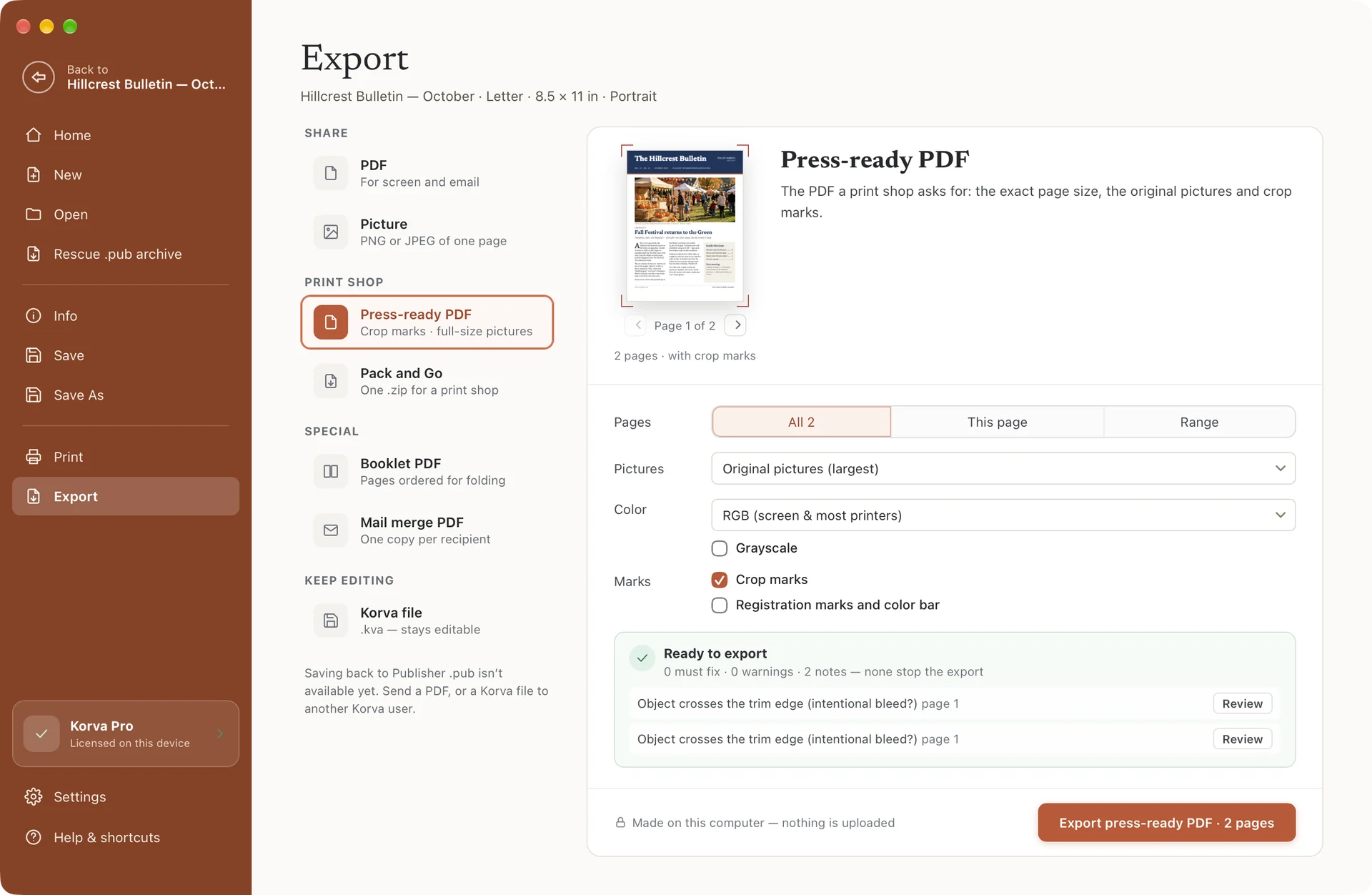
- Export for the destination. Choose PDF under File › Export for screen and email, or Press-ready PDF for a print shop, which adds crop marks at the exact page size and keeps the original pictures. You can export all pages, the current page or a range, and switch to grayscale for a mono copier. For a social post, the Picture option saves a page as a PNG or JPEG instead.
Korva exports RGB PDFs, which digital and most short-run print services accept, and can switch to composite CMYK with crop marks and bleed when a shop asks for it. It does not produce CMYK separations for offset prepress, so a job with that requirement belongs with a dedicated prepress tool. It runs offline on Mac, Windows and Linux with no account. A new user can export their first complete project free, as often as they need; Pro is a one-time $49 purchase rather than a subscription.

The short version: Letter (8.5 × 11 in) or A4 (210 × 297 mm) is the standard flyer size, half-page and A5 are the standard handouts, quarter-page, A6 and DL are the small formats, and 1080 × 1350 px is the default for a social feed. Pick the size from where the flyer will be seen, add 0.125 in (3 mm) of bleed only if someone is trimming it, and export at the size you will actually print. For the layout itself, our guide to making a flyer covers hierarchy, wording and paper, and if the piece needs to fold, see brochure folds and panel sizes. When you are ready to build one, download Korva and start from the flyer template.
Instagram, Facebook and WhatsApp are trademarks of Meta Platforms, Inc.; X and LinkedIn are trademarks of their respective owners. Korva is independent and not affiliated with or endorsed by any of them.
Frequently asked questions
What is the most common flyer size?
In the United States and Canada the most common flyer size is US Letter, 8.5 × 11 in (215.9 × 279.4 mm). Everywhere else it is A4, 210 × 297 mm (8.27 × 11.69 in). For handouts, the half-page flyer is just as common: 5.5 × 8.5 in in the US or A5 (148 × 210 mm) elsewhere, printed two to a sheet.
What size is a half-page or half-sheet flyer?
A half-page flyer, also called a half-sheet flyer, is 5.5 × 8.5 in (139.7 × 215.9 mm), which is a US Letter sheet cut in half. At 300 DPI it is 1650 × 2550 pixels. The metric equivalent is A5, 148 × 210 mm, which is half an A4 sheet. Both print two per sheet.
What size should an Instagram flyer be?
The safest Instagram feed size is 1080 × 1350 pixels, a 4:5 portrait. Instagram also accepts 1080 × 1440 pixels (3:4) when you post by hand, which fills the profile grid, and 1080 × 1920 pixels (9:16) for Stories and Reels. These are common conventions rather than fixed standards, so check the current specs before a big campaign.
What size is a DL flyer?
A DL flyer is 99 × 210 mm, about 3.9 × 8.27 in, or 1169 × 2480 pixels at 300 DPI. It is exactly one third of an A4 sheet, so three print on one A4 page, and it slides into a DL envelope, which is 110 × 220 mm. The closest US format is the 4 × 9 in rack card.
What size is a 4 × 6 flyer in pixels?
A 4 × 6 in flyer is 1200 × 1800 pixels at 300 DPI, or 101.6 × 152.4 mm. With a standard 0.125 in bleed on every side, the document becomes 4.25 × 6.25 in, which is 1275 × 1875 pixels. A 4 × 6 card also falls inside the USPS postcard-rate size range of 3.5 × 5 in to 4.25 × 6 in.
Do I need bleed on a flyer?
Only if color or a photo runs to the edge and someone will trim the sheet. Then the common convention is to extend the artwork 0.125 in (3 mm) past the trim line on every side and add crop marks; some printers ask for 0.25 in or 5 mm, so check. If your design has a white border, or you print at home, you do not need bleed.