Why won't my .pub file open in Korva?
If Korva says Could not open *file name* — it may be damaged or use a format Korva does not support, the file usually isn't a working Publisher file: it is damaged, empty, or a different kind of file with a .pub name. Try an earlier copy or a backup, and run the folder through the Rescue Center, which tells you why each file couldn't be read.
- In Korva
- File, then Open, or File, then Rescue .pub archive to see why
Korva opens Publisher files from every version, and when it can’t read the layout it still rescues the text and pictures. So when a file doesn’t open at all, the problem is almost always the file itself.
Read the message
The message appears under the buttons on the start screen:
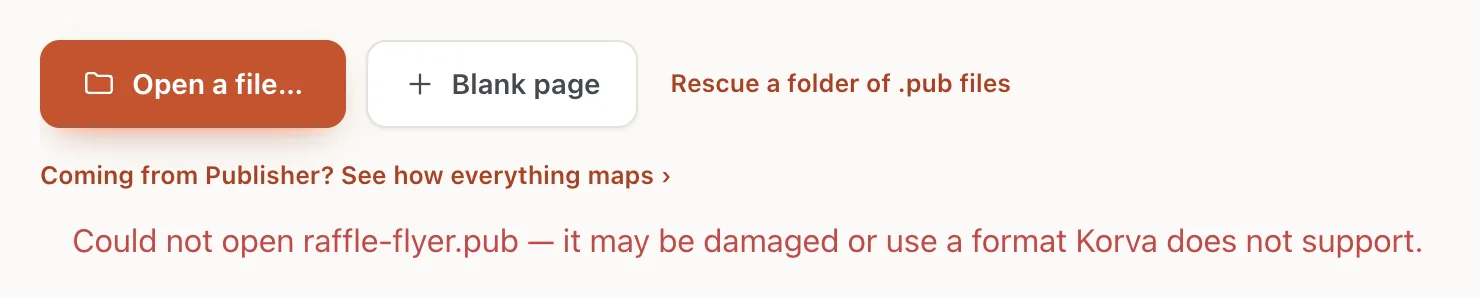
- 1Could not open …
What each message means:
- …it may be damaged or use a format Korva does not support. The file isn’t a readable Publisher file. See the causes below.
- …check that you have permission to read it, then try again. Your account isn’t allowed to read the file. Copy it to your Documents folder and open the copy.
- …it may have been moved, renamed or deleted. Usually from the Recent list: the file isn’t where it was. Use Open a file… and find it again.
Common causes
The file is damaged
A file that was cut short while copying, saved to a full USB stick, or rescued from a failing disk can’t be opened. Look for another copy: an email attachment you sent, a backup, a cloud folder’s version history, or the computer the file came from.
It isn’t a Publisher file
Other programs use the .pub ending too. SSH keys (for example id_rsa.pub) end in .pub but aren’t Publisher files, and a file renamed to .pub by hand stays whatever it was. If someone sent you the file, ask them which program made it.
The file is still in the cloud
OneDrive, iCloud Drive and Dropbox can show a file that hasn’t been downloaded yet. Open the file’s folder, make it available offline (for example Always keep on this device in OneDrive), wait for it to download, then open it in Korva.
The file is a PDF
Korva can’t open PDFs. If you only have a PDF of your publication, you can print it as it is, or rebuild it in Korva from a template.
Find out why with the Rescue Center
The Rescue Center checks one file or a whole folder and gives a reason for each file it couldn’t open.
- On the start screen, click Rescue a folder of .pub files, then Scan a folder.
- Choose the folder that holds the file.
- Find the file marked Couldn’t open and click Details.

- 1Couldn’t open
- 2Why Korva could not open it
This file is empty (0 bytes) means the file holds nothing at all; only another copy can help. See Check a folder of .pub files.
If it still doesn’t work
The file opens in Publisher but not in Korva
Please contact support and attach the file if you can. That is exactly the kind of file we want to fix the import for. Meanwhile, if you have Publisher, save it again as a new .pub file there and try the new copy.
The file opens, but the layout is gone
That isn’t a failed open: Korva rescued the text and pictures. See Layout kept or reflowed.
Double-clicking a .pub file doesn’t open Korva
Korva doesn’t take over double-clicks on .pub files yet. Open Korva first, then use Open a file… or drag the file onto the start screen.
Something wrong or missing in this article? Email support or open an issue on GitHub.
