How do I add columns, a drop cap or WordArt?
Select a text box and open the Format pane's Text tab. Set Columns under Text fit, and Drop cap under Fancy. For a curved headline, click Insert, then WordArt, type your text, pick a shape and click Insert.
- In Publisher
- Text Box Tools, then Format, then Columns, Drop Cap; Insert, then WordArt
- In Korva
- Format pane, then Text, then Columns and Drop cap; Insert, then WordArt
Columns, drop caps and WordArt are settings of a text box, so you change them with the box selected. They print and export as you see them on the page.
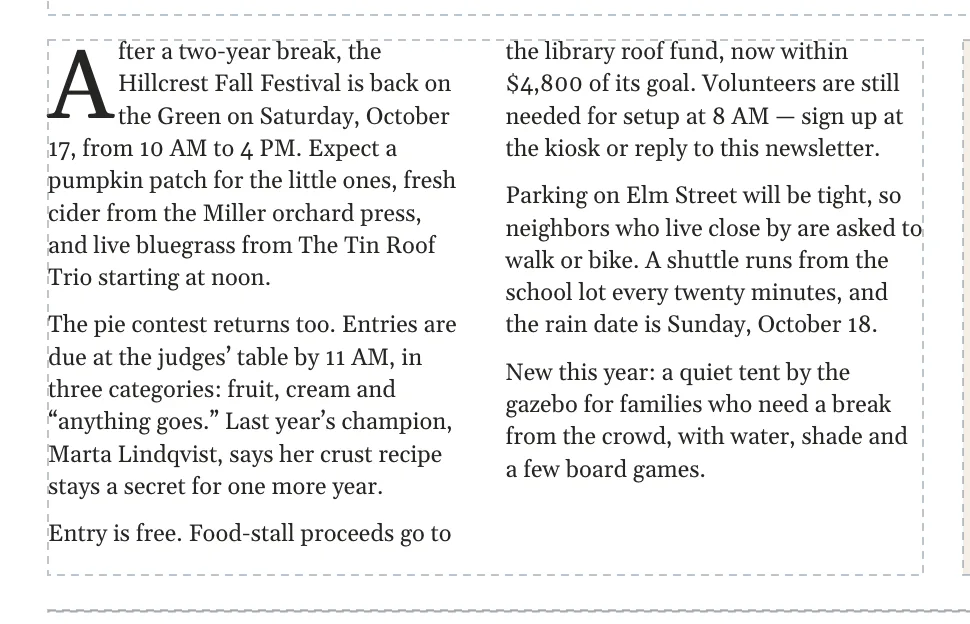
Split a text box into columns
- Click the text box.
- In the Format pane, open the Text tab.
- Under Text fit, set Columns with the arrows or type a number from 1 to 6.
The text runs down the first column and on into the next, like a newspaper. Korva sets the space between the columns; there’s no setting for it.
Start a paragraph with a drop cap
- Click the text box. In a story that runs through several linked boxes, any of its boxes will do.
- In the Text tab, under Fancy, choose Drop cap: 2 lines, 3 lines or 4 lines.
The first letter of the story’s first paragraph becomes a large capital that sits down beside that many lines. Choose None to remove it.
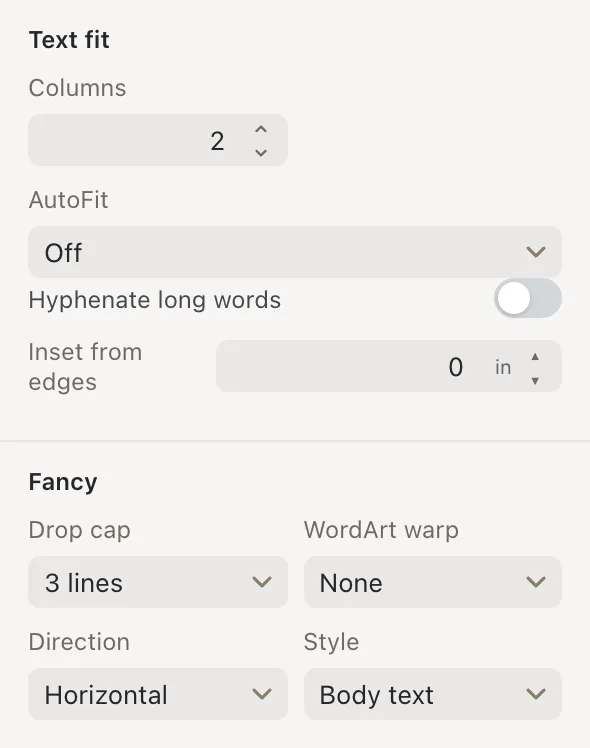
- 1Columns
- 2Drop cap
- 3WordArt warp
- 4Direction
Add WordArt
- Click Insert, then WordArt.
- Type your words in Text.
- Under Shape, pick Straight, Arch Up, Arch Down, Wave or Button.
- Click Insert, or press ↩Enter.
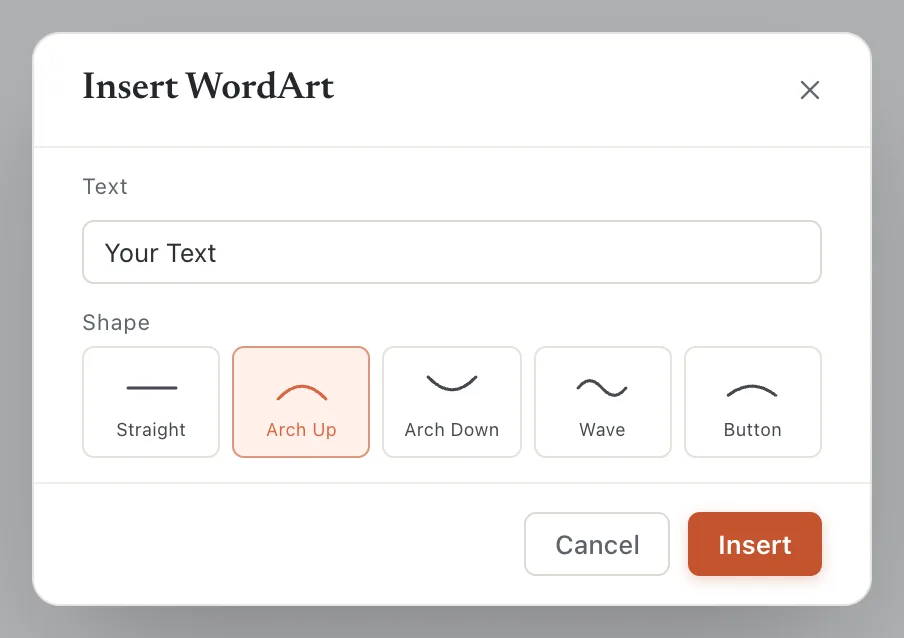
- 1Text
- 2Shape
- 3Insert
The WordArt lands in the middle of the page as large, bold, blue text. It is a text box, so you change it the same way as any other text:
- Double-click it to change the words.
- Use the Home tab’s Font group to change the font, size and color.
- Change the shape later under Fancy, then WordArt warp in the Format pane.

Turn text sideways
Under Fancy, then Direction, choose Rotate 90° (up) or Rotate 270° (down) to run the text up or down the box, for example on a spine or a tear-off strip. Horizontal puts it back.
To tilt the whole box at any angle, drag the round handle above it, or use the Format pane’s Arrange tab.
If it still doesn’t work
The drop cap is on the wrong paragraph
A drop cap belongs to the first paragraph of the story. To give a later paragraph a drop cap, put that paragraph in a text box of its own.
The second column is empty
The text fits in the first column. Columns fill one after another, so the next column starts only when the first is full. Make the box shorter, or add more text.
WordArt looks cut off
The box is too small for the curved text. Drag a corner handle to make it bigger, or lower the font size.
Something wrong or missing in this article? Email support or open an issue on GitHub.
